GTA 6 Preload: PS5 and Xbox Times, Download and Storage
November 10, 2026 · 2 min read · Arthur Wallace
On this page
GTA 6 preloading begins November 10, 2026. Rockstar’s support page gives midnight local time on PS5 and 00:00 GMT worldwide on Xbox Series X|S. This corrects the November 12 date previously reported here.
Checked November 10, 2026 against Rockstar’s preload FAQ.
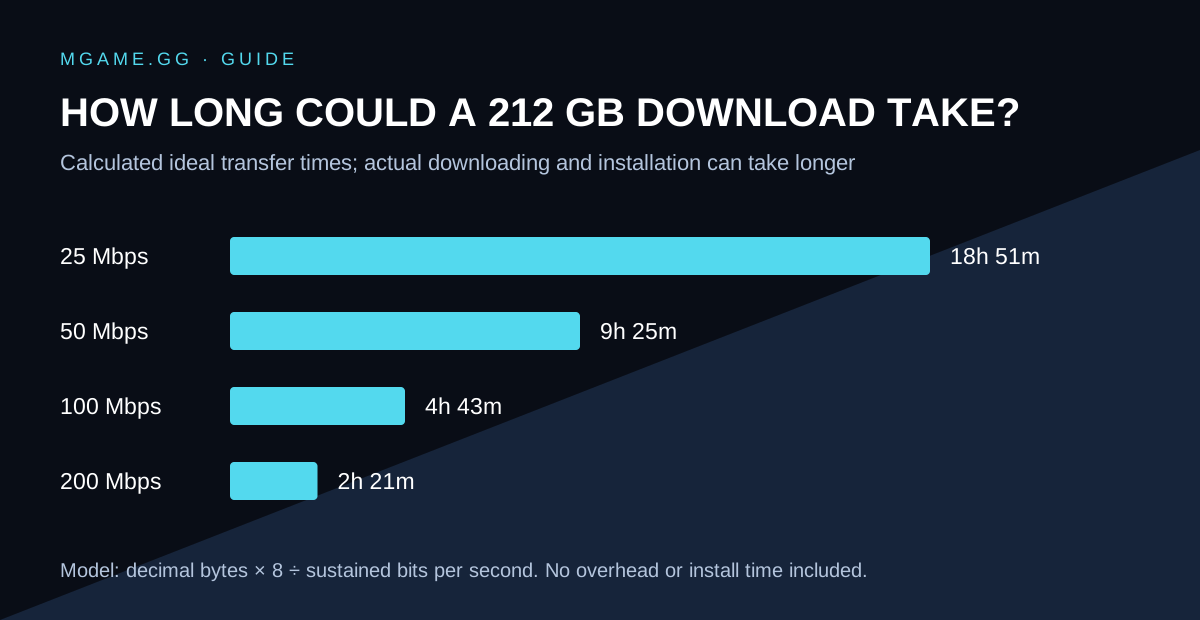
Calculated illustration; actual transfer and installation times can be longer.
Can I preload GTA 6 now?
The stated opening date has arrived. If your digital order is eligible and the download has not appeared, confirm the console account owns the order and check the game in your library.
Preloading installs files; it does not unlock the game early. Rockstar’s GTA VI page still lists November 19, 2026 for release on PS5 and Xbox Series X|S.
What time does Xbox preload start in the US?
The global 00:00 GMT on November 10 opening converts to 7 PM EST or 4 PM PST on November 9. PS5’s announced opening uses local midnight instead. Do not use the Xbox conversion as the PS5 schedule.
How to download on PS5
PlayStation’s pre-order and auto-download instructions explain the library flow:
- Open Game Library, then Your Collection.
- Select GTA VI and open its countdown.
- Select the content to auto-download and confirm.
- Check the Downloads/Uploads queue once downloading is available.
For automatic downloads while away, check the console’s internet and rest-mode settings. If the library still shows only a countdown, use PlayStation’s support instructions and verify that the pre-order completed on this account.
How to download on Xbox Series X|S
Open the game’s library or store page on the account that owns the order and check its installation option. Rockstar says automatic updates should be enabled, with the console powered on or in Sleep mode for unattended downloads. Its FAQ links directly to Xbox’s pre-order help.
How much space do I need?
Rockstar says to allow up to 212 GB, depending on the device. Read the size shown by your console when the download starts.
Estimate the download time
Using 212 GB as an example, these are ideal transfer times, calculated as bytes × 8 ÷ connection speed. Actual downloads can take longer because of network overhead, congestion, Wi-Fi and installation work.
| Sustained speed | Ideal time for 212 GB |
|---|---|
| 25 Mbps | About 18 hours 51 minutes |
| 50 Mbps | About 9 hours 25 minutes |
| 100 Mbps | About 4 hours 43 minutes |
| 200 Mbps | About 2 hours 21 minutes |
What if the download will not start?
Check three things separately: ownership, free storage and the download queue. Record any error code before retrying. A locked game after installation is different from a failed download; preloading is not early access.
For physical orders, follow your retailer’s delivery and redemption instructions rather than assuming that the digital preload date guarantees early delivery. Review our release date guide before planning when to play.